Mac Mini M4 & M5 Pro (2026): The Ultimate Powerhouse Desktop Guide
The Apple Mac Mini has always been the “little engine that could” in the world of computing. For years, people looked at this tiny silver box and wondered how something so small could do so much work. Today, in 2026, that conversation has shifted completely. We are no longer asking if it is powerful enough; we are asking how Apple managed to fit a supercomputer into a chassis the size of a thick sandwich.
What makes the Mac Mini so special is its versatility. Unlike an iMac or a MacBook, you aren’t forced into a specific screen or keyboard. You bring your own gear, which makes it a favorite for “bargain hunters” and professional setup enthusiasts alike. With the transition to Apple Silicon reaching its peak with the latest chips, the current lineup offers a level of speed that was once reserved for machines costing thousands of dollars.
Breaking Down the Mac Mini M4 Specs
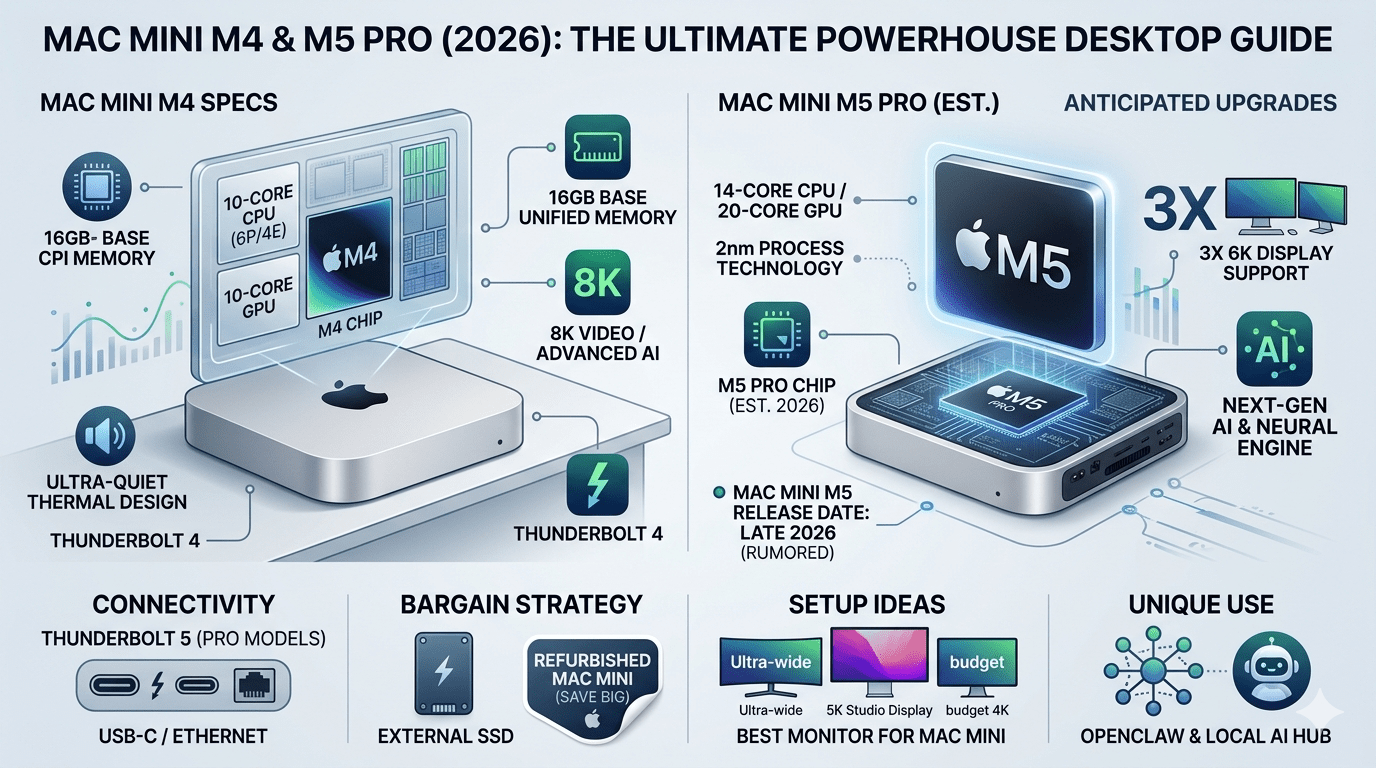
If you are looking for the sweet spot of modern computing, the Mac Mini M4 is the answer. Released late in 2024 and refined through 2025, the M4 model introduced a massive leap in efficiency. It features a 10-core CPU and a 10-core GPU that handles everything from 8K video playback to complex AI tasks with ease. One of the biggest upgrades we’ve seen is the standard 16GB of unified memory.
The Mac Mini M4 specs also include a redesigned thermal system. Even when you are pushing the processor to its absolute limits, the machine stays whisper-quiet. This is a huge win for creative professionals who need a silent environment for recording audio or focusing on deep work.
Why the Mac Mini M4 Pro is a Game Changer
For those who need even more “oomph,” the Mac Mini M4 Pro is the heavy hitter of the family. While the standard M4 is great for most people, the Pro version is designed for those who live in apps like Final Cut Pro, Logic, or complex 3D rendering software. It boasts up to a 14-core CPU and a staggering 20-core GPU. This isn’t just a minor bump in speed; it’s a transformational difference for workflows that involve heavy multitasking.
Connectivity on the Mac Mini M4 Pro is also a step above. It was one of the first Macs to fully embrace Thunderbolt 5, allowing for astronomical bandwidth that can support up to three 6K displays simultaneously. Imagine having a massive panoramic view of your timeline or code without any lag or flickering.
Is the Mac Mini M5 Worth the Wait?
As we move through 2026, the tech world is buzzing with rumors about the Mac Mini M5. Leaks suggest that Apple is planning a mid-to-late 2026 launch for this next-generation chip. The Mac Mini M5 release date is expected to coincide with a new “Fusion Architecture” that Apple recently debuted in its higher-end laptops.
Waiters might be rewarded with a higher base storage of 512GB, effectively ending the era of the “storage anxiety” that plagued older models. However, the question remains: should you wait for the m4 mac mini successor? If you need a computer today, the M4 is so powerful that most users won’t even notice the difference for daily tasks. But if you are a “spec-head” who wants the absolute latest 2nm process technology, keeping an eye on the mac mini m5 news is a smart move.
Comparing the Classics: M1, M2, and M3 Mac Mini
It is fascinating to look back at how we got here. The Mac Mini M1 was the revolution that started it all in 2020. It proved that Apple could ditch Intel and create a silent, cool-running machine that outperformed bulky PCs. Even today, a refurbished mac mini with an M1 chip is an incredible bargain for basic office work and web browsing. Then came the Mac Mini M2, which refined the recipe with better graphics and support for more external displays.
The Mac Mini M3 was a bit of a “hidden gem” because it arrived during a time of rapid-fire releases. While some skipped it, those who bought the m3 mac mini enjoyed a significant jump in single-core performance, which makes every click feel instantaneous. Comparing the m2 mac mini to the m3 mac mini shows a clear progression in “Neural Engine” speed, which is becoming more important as we use more AI-driven features in macOS.
The “HowToGeek Mac Mini Bargain” Strategy
If you’ve been following tech blogs, you might have heard of the HowToGeek Mac Mini bargain strategy. It’s a clever way to get the most “bang for your buck.” The idea is simple: instead of buying the most expensive Mac Mini with all the internal upgrades, you buy the base model and use the savings to buy external peripherals. Since the Apple Mac Mini is so modular, you can add a massive 4TB external SSD for a fraction of what Apple charges for internal storage.
Another part of this bargain strategy is looking for a mac mini refurbished. Apple’s official refurbished store is legendary for providing products that look and act brand new, often with the same one-year warranty. You can often find an m1 mac mini or an m2 mac mini at 15–20% off the original price.
Finding the Best Monitor for Mac Mini
One of the most common questions I get is, “What is the best monitor for mac mini?” Because the computer doesn’t come with a screen, your choice here defines your entire experience. In 2026, the options are better than ever. If you want the “official” experience, the Apple Studio Display is the gold standard, offering 5K resolution and perfect integration.
When choosing a display for your apple mac mini m4, you should look for a screen that offers USB-C or Thunderbolt connectivity. This allows you to use a single cable to send the video signal to the monitor while also using the monitor’s built-in USB ports for your mouse and keyboard. It keeps your desk looking clean and organized—which is one of the main reasons people buy a Mac Mini in the first place!
Performance Powerhouse: Comparing the Chips
| Model | CPU Cores | GPU Cores | Best For |
| Mac Mini M1 | 8-Core | 8-Core | Basic Office, Students, Web Browsing |
| Mac Mini M2 | 8-Core | 10-Core | Photo Editing, Multi-tasking, Entry Coding |
| Mac Mini M3 | 8-Core | 10-Core | AI Tools, Smooth Daily Performance |
| Mac Mini M4 | 10-Core | 10-Core | 4K Video Editing, Advanced AI, Future-Proofing |
| Mac Mini M4 Pro | 14-Core | 20-Core | Professional Workflows, 3D Design, Triple 6K Monitors |
| Mac Mini M5 (Est.) | 12-Core | 16-Core | Extreme Efficiency, Next-Gen Gaming, Heavy LLM Tasks |
What is a Mac Mini and Who is it For?
You might be asking, “What is a mac mini exactly?” Simply put, it is a desktop computer without the “extras.” It is the computer “brain.” You provide the monitor, the keyboard, and the mouse. This makes it perfect for two types of people. First, it’s for the “switcher” coming from a PC who already has a nice monitor and doesn’t want to throw it away.
The beauty of the apple mac mini is that it grows with you. If you start with a cheap monitor today, you can upgrade to a professional 5K screen later without having to buy a whole new computer. It is the most sustainable way to own a Mac. Because it lacks a built-in battery or screen that can wear out, Mac Minis tend to last a very long time.
Experimenting with OpenClaw and Local AI
A very cool trend in 2026 is using the Mac Mini as a dedicated “AI Hub.” Because the m4 mac mini has such a powerful Neural Engine, users are running tools like OpenClaw Mac Mini setups. OpenClaw is a local AI automation agent that can browse the web and perform tasks for you.
Even if you aren’t a coder, having a machine that can handle local Large Language Models (LLMs) is becoming a huge advantage. Features like “Apple Intelligence” rely on the hardware inside your mac mini m4 specs to summarize emails, edit photos, and help you write.
How to Get the Best Price on a Mac Mini
Ready to buy? To get the best deal, you have to be a bit strategic. Retailers like Amazon, B&H, and Best Buy often have sales on the apple mac mini m4 that beat the official Apple Store price by $50 or $100. If you are looking for an even deeper discount, the mac mini refurbished section on Apple’s website is refreshed almost daily. Pro tip: use a tracker website to get notified when the specific model you want—like an m2 mac mini with extra RAM—pops back into stock.
Don’t forget the education discount! If you are a student or a teacher, Apple offers a year-round discount on the mac mini. Often, during the “Back to School” season, they will even throw in a gift card or a pair of headphones. When you combine these discounts with the “bargain strategy” of using external storage, you can get a world-class computing experience for under $600.
Frequently Asked Questions (FAQs)
Can the Mac Mini M4 run two monitors?
Yes! The standard Mac Mini M4 can support up to two high-resolution displays. If you step up to the Mac Mini M4 Pro, you can actually run three 6K displays at the same time using the new Thunderbolt 5 ports. This makes it a perfect choice for stock traders or video editors who need a lot of screen real estate.
Is 16GB of RAM enough for the Mac Mini in 2026?
For most people, yes. In 2024, Apple moved the base model to 16GB, which was a huge win. For web browsing, office work, and light photo editing, 16GB is plenty. However, if you are doing professional 4K video editing or running local AI models like OpenClaw, you might want to consider upgrading to 24GB or 32GB to be safe.
When is the Mac Mini M5 release date?
While Apple hasn’t officially announced it, industry experts expect the Mac Mini M5 to arrive in late 2026. It will likely feature the new 2nm chip process, offering even better battery efficiency (for the laptops) and massive GPU gains for the desktop. If you need a computer now, the M4 is excellent, but if you can wait 6-12 months, the M5 will be a beast.
What is the best monitor for Mac Mini on a budget?
The ASUS ProArt PA27JCV is currently considered the best “budget” 5K monitor. It offers the same crispness as Apple’s own Studio Display but at a significantly lower price point. If you want something even cheaper, any 27-inch 4K monitor will work great, though you may need to adjust the scaling settings in macOS for the best look.
Can I upgrade the storage on a Mac Mini later?
You cannot upgrade the internal SSD because it is soldered to the motherboard. However, you can easily add external storage. Using the HowToGeek Mac Mini bargain strategy, you can plug in a fast external Thunderbolt drive and it will act almost exactly like internal storage, saving you hundreds of dollars on the initial purchase.
Is a refurbished Mac Mini safe to buy?
Absolutely! Buying a mac mini refurbished directly from Apple is one of the best-kept secrets in tech. They replace the outer shell, include all original accessories, and give you a full warranty. It’s a 100% safe way to get a more powerful model, like a mac mini m2 pro, for the price of a base model.
Conclusion: The Future is Small and Fast
The Apple Mac Mini has proved that you don’t need a giant tower to do great things. From the legendary m1 mac mini that started the revolution to the upcoming rumors of the mac mini m5, this lineup continues to surprise and delight. It is a machine that fits into any life—whether you are a creative pro, a casual browser, or a tech enthusiast building an AI server.
If you are on the fence, just look at the mac mini m4 specs and compare them to any PC in the same price bracket. The speed, the silence, and the build quality are simply on another level. Whether you choose a brand new model or a refurbished mac mini, you are joining a community of users who value efficiency and elegance.